When AI repeats a wrong claim from someone else's site
A wrong AI answer about your brand often starts on a page you don't own. How to find that page, what you can change about it, and how to tell if the fix worked.
A pattern we keep running into in brand audits: the wrong claim doesn't come from the client's own site. It comes from a comparison roundup written two years ago, a directory profile someone filled in and never touched again, or a review page that describes a plan that no longer exists. The engine reads that page, repeats the claim, and sometimes cites it. Meanwhile the client's site says nothing on the point at all.
That's the harder version of the problem, because the page causing it isn't yours to edit. This post is about that case only. For the general audit, from source of truth to re-test, see how we fact-check what AI says about a brand.
Why the wrong claim lives on someone else's page
Engines that search before they answer, like ChatGPT with search, Perplexity, Google AI Overviews, and AI Mode, build the answer from pages they retrieve for the prompt and the sub-queries they run behind it. Third-party pages are very good at being retrieved for brand questions. They are written about you, often with the buyer's exact phrasing in the heading: "[brand] pricing", "[brand] vs [competitor]", "best tools for [use case]". They also age quietly. Nobody at the publisher is paid to notice that your plans changed.
The second cause is on your side. If your site never states the fact plainly, the third-party page is the only page that states anything, and it wins by default. Pricing behind a sales call, an integration list buried in a PDF, a retired product that still has a page with no note saying it's retired: each of these leaves a gap that someone else's page fills.
So the fix is rarely one action. You find the page, decide what you can influence, and close the gap on your own site whatever happens with the publisher.
Step 1: write down the claim in the engine's words
Don't work from a paraphrase. "ChatGPT gets our pricing wrong" isn't something you can trace. "Has a free plan with 10 users" is.
In Promptwatch, Brand Narrative does this extraction for you. It pulls the individual claims AI makes about you and your competitors out of every tracked response, groups the repeats, and shows how often each one is said and by which models. Each claim is filed under a theme such as Pricing, Features, Support, or Reputation and scored positive, neutral, negative, or mixed, and each theme rolls up into a score from 0 to 100 you can compare against competitors. Since November 4 the claims table puts the most negative claims at the top.
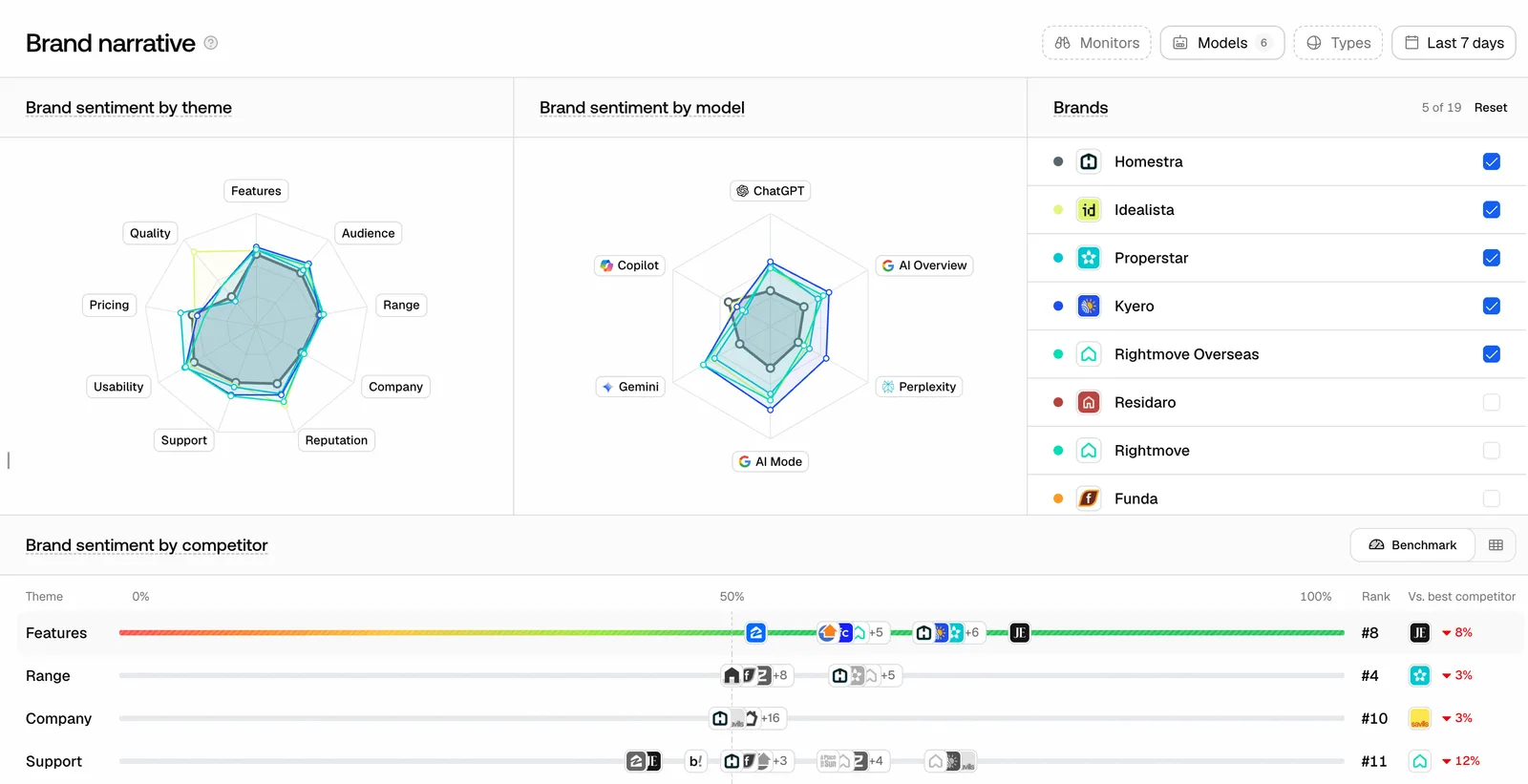 Promptwatch Brand Narrative, from the Promptwatch changelog (October 30, 2026). Example project data.
One caution. Negative isn't the same as wrong. A claim that you have a free plan sounds positive and can still be false. Read the Pricing and Features themes line by line rather than only the red rows.
Step 2: find the page the engine took it from
The manual route works for one claim. Open the responses that contain it, list the cited sources, open each page, and search it for the wording. Expect the claim to sit on more than one page, and expect some answers to repeat it with no citation at all. Those you can only fix indirectly.
Promptwatch's Fact Check does this across the sources. You mark a claim Accurate or Inaccurate, and the check reads the pages crawled from your site for ones that state it or the opposite. Since November 6 it also reads the third-party pages AI answers cite for that claim: the 50 most-cited offsite pages per check. Before that change, a claim AI picked up from someone else's page came back as Not stated, which was accurate about your site and useless for this problem.
You still get one verdict. The banner says whether it rests on your site, on cited sources, or on both. The claim sheet lists every quoted page under All evidence, Your site, and Cited sources, and shows when the check ran and how many credits it used. Reading the cited pages is part of a check's credit cost, and you see the estimate before it runs.
How we read the banner:
- If the verdict rests on cited sources only, your site is silent on the point and a third-party page is doing the talking. The Cited sources tab gives you the URL and the quote.
- If it rests on your own site, the culprit is usually an old page on your domain. That's the easy case, and it's covered in our post on when AI engines get your facts wrong.
- If it rests on both, compare the quotes. Sometimes your page and the third-party page say the same outdated thing. Sometimes they disagree, and the engine is picking the one it retrieved.
Step 3: decide what you can change
You can't edit the publisher's page, and you can't ask the engine to ignore it. What you can do is shift what the engine finds when it searches.
Make your own page state the fact. This comes first because it's fully in your control. Put the correct fact in a plain sentence, near the top, on the page that should answer the question. If the check flagged pages on your site, Fix with content agent refreshes every flagged page at once, one article per page, and each refresh includes what you say is true and the exact sentences to rewrite on that page. If the verdict rested on cited sources only, there may be nothing on your site to flag. Then you need a page that answers the question, not a refresh.
Ask the publisher for a correction. Send one short message with the URL, the quoted sentence, the correct fact, and a link to your page that states it. Make the correction something an editor can do in a minute; that gives it the best chance. For directories and review platforms, use the listing's own edit or claim process rather than emailing support. Some won't answer. Keep a dated record and move on.
Get the fact onto pages AI already cites. The pages already in the answer are the ones worth working on, because they are already being retrieved. Citation analytics shows which domains and pages are cited for the prompts where the claim shows up, and the Directory source type separates listing and review sites from the rest. Offsite Mentions lists pages that name you without linking, and since November 6 it has a Domains filter. In our experience, a correct profile on a directory the engines already cite is worth more than a new page on a site they have never read.
What we don't do: publish counter-pages on throwaway domains, or flood review sites with accounts. It's dishonest, and it hands the engine another unreliable source.
Step 4: check the engine can read your corrected page
A fix the crawler hasn't seen hasn't happened yet. Agent Analytics shows IP-verified AI crawler visits per page, so you can see whether OAI-SearchBot or ChatGPT-User fetched the page after you changed it. Crawler logs start on Professional. The page's Content tab on the Sitemap shows the page as it was crawled, as a preview or as markdown, and when the last two site audits both read it, how much changed between them. If your new sentence isn't in the crawled version, wait or check access before you rewrite anything else.
Step 5: measure whether it worked
Since November 4 the Fact Check runs tab shows an accuracy score: the share of your brand's checked mentions that are accurate. A claim you marked yourself counts the way you marked it. Otherwise the latest completed fact check decides. Inconclusive and unchecked claims are left out. A heatmap shows accuracy per model and theme, so you can see which model repeats wrong claims, and about what.
Read that score with its definition in mind. It only covers checked claims, so checking a new batch of claims can move it without a single answer changing. When we compare periods for a client, we keep the set of checked claims fixed and add new ones in a separate note.
For one specific claim, the clearer signal sits in Brand Narrative: is the grouped claim said less often, and by fewer models? Then re-run the fact check after the publisher responds or your page is recrawled. The Cited sources tab should show the corrected page, a different page, or nothing. We have no sourced timeline for how fast engines pick up a change, so we re-check weekly and don't promise a date.
How we run this for clients
Every wrong claim becomes a custom action on the Action Board with the claim, the source URL, the move we chose, and the date we chose it. Agent Chat now opens on Brand Narrative and Fact Check, so "which models still say this?" is a question we can ask on the page instead of filtering by hand. The written record matters more than the tooling: when a client asks what we did about the old pricing claim, the answer is one row with the URL and the date.
Plans, plainly
Brand Narrative is on every Promptwatch plan. Fact Check is on Business ($579 a month), Agency Scale ($799), and Enterprise, and each check uses agent credits. The Content Agent behind Fix with content agent is a Business and Enterprise feature, not part of the self-serve agency plans. Crawler logs start on Professional ($245).
We run client programs on Promptwatch because it keeps the claim, the pages behind it, the fix, and the re-check in one place. If you want to see which third-party pages are shaping what AI says about you, start the 7-day free trial on Business, where Fact Check is included.